
티스토리 뷰
Rodrigo Pombo의 Build your own React 블로그 글을 참고해서 리액트의 기본 개념, 기능들을 직접 따라 만들어 보면서, 신경쓰지 못한 부분을 알고 가고자 한다.
알아가는 과정 속에서 원글을 응용하여 직접 돌려보며 확인해볼 수 있는 실습환경을 구성 및 번역 내용이 들어간 프로젝트를 만들었다. learn-react-by-building-ko
이전 글에서는 기본적인 구조화된 객체를 실제 DOM으로 만들어 보며, 리액트가 JSX와 DOM 요소를 어떻게 구성하는지 복습하며 알아봤었습니다.
오늘은 리액트의 createElement, render 함수를 만들어 보며 원리와 동작을 이해해보고 성능 최적화를 위한 Concurrent Mode에 대해서 알아보는 시간을 가져보려 합니다.
똑같이 원글을 따라 가며, Step1~Step3 까지의 내용을 담고 있으며 각 스텝마다 실습을 구성했습니다.
Step I: createElement 함수
또 다른 앱으로 다시 시작해봅시다. 이번에는 React 코드를 우리가 직접 만든 React 버전으로 대체할 겁니다.
먼저 우리만의 createElement를 작성하는 것부터 시작하겠습니다.
JSX를 JS로 변환해서 createElement 호출이 어떻게 생겼는지 살펴봅시다.
const element = (
  <div id="foo">
    <a>bar</a>
    <b />
  </div>
);

const container = document.getElementById('root');

ReactDOM.render(element, container);
이전 단계에서 봤듯이, 엘리먼트는 type과 props를 가진 객체입니다. 우리 함수가 해야 할 일은 그 객체를 만드는 것뿐입니다.
const element = React.createElement(
  'div',
  { id: 'foo' },
  React.createElement('a', null, 'bar'),
  React.createElement('b'),
);

const container = document.getElementById('root');

ReactDOM.render(element, container);
props에는 스프레드 연산자를 쓰고, children에는 나머지 매개변수(rest parameter) 문법을 씁니다. 이렇게 하면 children prop은 항상 배열이 됩니다.
function createElement(type, props, ...children) {
  return {
    type,
    props: {
      ...props,
      children,
    },
  };
}
예를 들어, createElement("div")는 다음을 반환합니다:
{
    "type": "div",
    "props": { "children": [] }
}
createElement("div", null, a)는 다음을 반환합니다:
{
    "type": "div",
    "props": { "children": [a] }
}
그리고 createElement("div", null, a, b)는 다음을 반환합니다:
{
    "type": "div",
    "props": { "children": [a, b] }
}
children 배열에는 문자열이나 숫자 같은 원시 값(primitive value)도 들어갈 수 있습니다. 그래서 객체가 아닌 모든 값은 자체 엘리먼트로 감싸고, 이를 위한 특별한 타입을 만들 겁니다: TEXT_ELEMENT.
React는 원시 값을 감싸지도 않고, children이 없을 때 빈 배열을 만들지도 않습니다. 하지만 우리는 코드를 단순화하기 위해 이렇게 합니다. 이 라이브러리에서는 성능보다 단순한 코드를 선호하니까요.
function createElement(type, props, ...children) {
return {
type,
props: {
...props,
children: children.map(child =>
typeof child === "object"
? child
: createTextElement(child)
),
},
}
}
function createTextElement(text) {
return {
type: "TEXT_ELEMENT",
props: {
nodeValue: text,
children: [],
},
}
}
const element = React.createElement(
"div",
{ id: "foo" },
React.createElement("a", null, "bar"),
React.createElement("b")
)
우리는 아직도 React의 createElement를 사용하고 있습니다.
이걸 대체하기 위해 우리 라이브러리에 이름을 붙여줍시다. React처럼 들리면서도 학습 목적이라는 점을 암시하는 이름이 필요합니다.
이걸 Didact라고 부르겠습니다.
function createElement(type, props, ...children) {
return {
type,
props: {
...props,
children: children.map(child =>
typeof child === "object"
? child
: createTextElement(child)
),
},
}
}
function createTextElement(text) {
return {
type: "TEXT_ELEMENT",
props: {
nodeValue: text,
children: [],
},
}
}
const Didact = {
createElement,
}
const element = Didact.createElement(
"div",
{ id: "foo" },
Didact.createElement("a", null, "bar"),
Didact.createElement("b")
)
const container = document.getElementById("root")
ReactDOM.render(element, container)
하지만 여기서도 JSX는 계속 쓰고 싶습니다. React의 createElement 대신 Didact의 createElement를 쓰라고 babel에게 어떻게 알려줄까요?
다음과 같은 주석을 달아두면, babel이 JSX를 트랜스파일할 때 우리가 정의한 함수를 사용하게 됩니다.
/** @jsx Didact.createElement */

const element = (
  <div id="foo">
    <a>bar</a>
    <b />
  </div>

);
제가 만든 프로젝트에서는 pnpm step1 을 호출하면 index1.js 결과가 생성됩니다.
생성 결과 아래와 같이 React + Babel이 진행한 내용과 같이 만들어졌습니다.
/** @jsx Didact.createElement */

var element = Didact.createElement(
  'div',
  {
    id: 'foo',
  },
  Didact.createElement('a', null, 'bar'),
  Didact.createElement('b', null),
);
Step II: render 함수
다음으로, ReactDOM.render 함수의 우리 버전을 작성해야 합니다.
function render(element, container) {

  // TODO create dom nodes

}


const Didact = {
  createElement,
  render,
};


/** @jsx Didact.createElement */

const element = (
  <div id="foo">
    <a>bar</a>
    <b />
  </div>
);


const container = document.getElementById('root');

Didact.render(element, container);
지금은 DOM에 무언가를 추가하는 것에만 신경 씁니다. 업데이트와 삭제는 나중에 다루겠습니다.
먼저 엘리먼트의 type을 사용해 DOM 노드를 만들고, 그 새 노드를 container에 붙입니다.
각 자식(child)에 대해서도 같은 작업을 재귀적으로 수행합니다.
// 프로젝트에서는 함수 동작을 이해하기 위한 인자를 직관적으로 추가해보았습니다.

const element = {
  type: "div",
  props: {
    id: "foo",
    children: [{
      type: "a",
      props: {
        children: [{
          type: "TEXT_ELEMENT",
          props: {
            nodeValue: "bar",
            children: [],
          },
        }]
      }
    },{
      type: "b",
      props: {
        children: []
      }
    }],
  },
}

function render(element, container) {
  const dom = document.createElement(element.type)

  element.props.children.forEach(child =>
    render(child, dom)
  )

  container.appendChild(dom)
}
텍스트 엘리먼트도 처리해야 합니다. 엘리먼트의 type이 TEXT_ELEMENT라면 일반 노드 대신 텍스트 노드를 만듭니다.
function render(element, container) {
  const dom =  element.type == "TEXT_ELEMENT"
      ? document.createTextNode("")
      : document.createElement(element.type);

  const isProperty = key => key !== "children";
  Object.keys(element.props)
    .filter(isProperty)
    .forEach(name => {
      dom[name] = element.props[name]
    });

  element.props.children.forEach(child =>
    render(child, dom)
  );

  container.appendChild(dom);
}
마지막으로 해야 할 일은 엘리먼트의 props를 노드에 할당하는 것입니다.
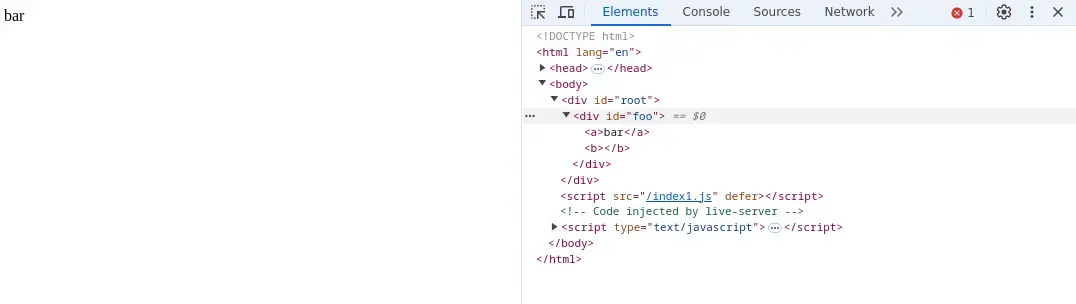
이게 전부입니다. 이제 우리는 JSX를 DOM으로 렌더링할 수 있는 라이브러리를 갖게 됐습니다.
프로젝트에서는 step2-1을 실행하여 index.js를 index1.js로 트랜스파일 후 step2-2을 실행시켜 렌더링 모습을 확인해봅시다.
Step III: Concurrent Mode (동시성 모드)
하지만... 코드를 더 추가하기 전에 리팩터링이 필요합니다.
이 재귀 호출에는 문제가 있습니다.
function render(element, container) {
  const dom =
    element.type == "TEXT_ELEMENT"
      ? document.createTextNode("")
      : document.createElement(element.type)

  const isProperty = key => key !== "children"
  Object.keys(element.props)
    .filter(isProperty)
    .forEach(name => {
      dom[name] = element.props[name]
    })

  element.props.children.forEach(child =>
    render(child, dom)
  )


  container.appendChild(dom)
}
렌더링을 한 번 시작하면, 엘리먼트 트리 전체를 다 렌더링할 때까지 멈추지 않습니다. 엘리먼트 트리가 크면 메인 스레드를 너무 오래 차단할 수 있습니다. 그리고 브라우저가 사용자 입력 처리나 애니메이션을 부드럽게 유지하는 것 같은 우선순위 높은 작업을 해야 한다면, 렌더링이 끝날 때까지 기다려야만 합니다.
그래서 우리는 작업을 작은 단위(unit)로 쪼갤 겁니다. 그리고 각 단위가 끝날 때마다, 다른 처리해야 할 일이 있다면 브라우저가 렌더링을 중단할 수 있도록 양보해줄 겁니다.
let nextUnitOfWork = null
function workLoop(deadline) {
let shouldYield = false
while (nextUnitOfWork && !shouldYield) {
nextUnitOfWork = performUnitOfWork(
nextUnitOfWork
)
shouldYield = deadline.timeRemaining() < 1
}
requestIdleCallback(workLoop)
}
requestIdleCallback(workLoop)
function performUnitOfWork(nextUnitOfWork) {
// TODO
}
루프를 만들기 위해 requestIdleCallback을 사용합니다. requestIdleCallback은 setTimeout과 비슷하다고 생각하면 됩니다. 다만 우리가 언제 실행할지 알려주는 게 아니라, 브라우저가 메인 스레드가 한가할 때 콜백을 실행해줍니다.
React는 더 이상 requestIdleCallback을 사용하지 않습니다. 지금은 scheduler 패키지를 사용합니다. 하지만 이번 사용 사례에서는 개념적으로 동일합니다.
requestIdleCallback은 deadline 매개변수도 함께 제공합니다. 이걸로 브라우저가 다시 제어권을 가져가기까지 시간이 얼마나 남았는지 확인할 수 있습니다.
2019년 11월 기준, Concurrent Mode는 아직 React에서 안정 버전이 아닙니다. 안정 버전의 루프는 이런 모양에 더 가깝습니다:
while (nextUnitOfWork) {
  nextUnitOfWork = performUnitOfWork(nextUnitOfWork);
}
루프를 사용하기 시작하려면, 첫 번째 작업 단위(unit of work)를 설정해야 합니다. 그리고 작업을 수행할 뿐만 아니라 다음 작업 단위도 반환하는 performUnitOfWork 함수를 작성해야 합니다.
해당 스탭에서는 실습이 없습니다. 이후 진행되는 step 과정 후 결과를 확인할 예정입니다.
마무리
해당 과정을 통해서 JSX가 babel을 통해서 구조화된 요소 객체로 만들어지기 위한 함수 createElement를 만들어 보았으며, createElement 함수의 반환 값을 통해서 구조화된 객체를 실제 DOM으로 만들어 표현할 수 있는 render 함수도 만들어 보았습니다.
그리고, 사용자의 경험 및 성능 최적화를 위해 실제 DOM을 만들어 가는 과정을 부분으로 쪼개어 처리하는 Concurrent mode 도 알아보았습니다. 아직 이해가 잘 되지 않을 수 있는데 다음 Step4의 Fiber 과정에서 어떤 형식으로 과정을 쪼개는지 구체적으로 알아볼 예정입니다.
'Dev > React' 카테고리의 다른 글
- Total
- Today
- Yesterday
- css
- redux-toolkit
- instagram CSS
- Firebase
- 그림판 만들기
- object
- Django
- html
- 기능추가
- NomadCoder
- RUBY
- project
- 오버라이딩
- Class
- 트위터 클론
- React
- nodejs
- 프론트엔드
- JavaScript
- Build your own React
- Python
- 바닐라js
- 드림코딩
- hooks
- nrc
- 생활코딩
- frontend
- github
- TypeScirpt
| 일 | 월 | 화 | 수 | 목 | 금 | 토 |
|---|---|---|---|---|---|---|
| 1 | ||||||
| 2 | 3 | 4 | 5 | 6 | 7 | 8 |
| 9 | 10 | 11 | 12 | 13 | 14 | 15 |
| 16 | 17 | 18 | 19 | 20 | 21 | 22 |
| 23 | 24 | 25 | 26 | 27 | 28 | 29 |
| 30 | 31 |